
Get Started
Backend
The backend (API / Dashboard) is built using Laravel. It can be run locally using Docker.
Prerequisites
- A Linux PC (recommended), a Windows PC or Mac
- A terminal simulator
- Docker & Docker Compose
- PHP 8.4 or above
- Composer 2.x
- Git
1. Clone the project
git clone https://git.vitayou.co/vitayou/vitayou-backend.git2. Prepare environment
Copy the .env.example to .env.
Change the environment variables to your liking. You can find the original developer's latest variables below.
Details
APP_NAME=VitaYou
APP_ENV=local
APP_KEY=REDACTED
APP_DEBUG=true
APP_URL=http://api.vitayou.local
APP_SERVICE=api.vitayou.local
APP_DEV_DOMAIN=api.vitayou.local

DASHBOARD_DOMAIN=dashboard.vitayou.local

STOREFRONT_DOMAIN=vitayou.local
STOREFRONT_URL=https://${STOREFRONT_DOMAIN}

CMS_URL=https://cms.dev.vitayou.co
CMS_AUTH_TOKEN=REDACTED
CMS_PREVENT_SYNC=true

APP_LOCALE=en
APP_FALLBACK_LOCALE=en
APP_FAKER_LOCALE=en_US

APP_MAINTENANCE_DRIVER=file
# APP_MAINTENANCE_STORE=database

PHP_CLI_SERVER_WORKERS=4

BCRYPT_ROUNDS=12

SAIL_XDEBUG_MODE=develop,debug,coverage
SAIL_XDEBUG_CONFIG="client_host=host.docker.internal"

LOG_CHANNEL=stack
LOG_STACK=single
LOG_DEPRECATIONS_CHANNEL=null
LOG_LEVEL=debug

DB_CONNECTION=mariadb
DB_HOST=mariadb
DB_PORT=3306
DB_DATABASE=vitayou_backend
DB_USERNAME=sail
DB_PASSWORD=password

ORBIT_DEFAULT_DRIVER=json

SESSION_DRIVER=database
SESSION_LIFETIME=120
SESSION_ENCRYPT=false
SESSION_PATH=/
SESSION_DOMAIN=.vitayou.local

BROADCAST_CONNECTION=pusher
FILESYSTEM_DISK=local
QUEUE_CONNECTION=database

CACHE_STORE=database
# CACHE_PREFIX=

MEMCACHED_HOST=127.0.0.1

REDIS_CLIENT=phpredis
REDIS_HOST=redis
REDIS_PASSWORD=null
REDIS_PORT=6379

MAIL_MAILER=smtp
MAIL_HOST=smtp.sendgrid.net
MAIL_PORT=587
MAIL_ENCRYPTION=starttls
MAIL_SCHEME=null
MAIL_USERNAME=apikey
MAIL_PASSWORD=REDACTED
MAIL_FROM_ADDRESS="mailing@vitayou.co"
MAIL_FROM_NAME="${APP_NAME}"
SENDGRID_API_KEY="REDACTED"
SENDGRID_SANDBOX=true

AWS_ACCESS_KEY_ID=
AWS_SECRET_ACCESS_KEY=
AWS_DEFAULT_REGION=us-east-1
AWS_BUCKET=
AWS_USE_PATH_STYLE_ENDPOINT=false

VITE_APP_NAME="${APP_NAME}"
VITE_PUSHER_APP_KEY="${PUSHER_APP_KEY}"
VITE_PUSHER_APP_CLUSTER="${PUSHER_APP_CLUSTER}"
VITE_PUSHER_HOST="${PUSHER_HOST}"
VITE_PUSHER_PORT="${PUSHER_PORT}"
VITE_PUSHER_SCHEME="${PUSHER_SCHEME}"

WWWGROUP=1000
WWWUSER=1000

SENTRY_LARAVEL_DSN=""
# SENTRY_LARAVEL_DSN="https://cdd2b977509f4d5fb313801030554b75@bug.vitayou.co/1"

SEED_USER_PASSWORD="som€R@nd0mßtuph"

UNATTENDED_CART_ROTATION_INTERVAL=24 # number of hours

PAYMENT_GATEWAY=Paratika
PARATIKA_MERCHANT_ID=REDACTED
PARATIKA_MERCHANT_USER="REDACTED"
PARATIKA_MERCHANT_PASS="REDACTED"
PARATIKA_MODE=test

SLACK_WEBHOOK=https://cdd2b977509f4d5fb313801030554b75@bug.vitayou.co/1

PDF_PARSER_API=http://vita_pdf_parser:5000/parse-pdf

EARSIV_USERNAME=REDACTED
EARSIV_PASSWORD=REDACTED

TAXPAYER_QUERY_API_BASE=https://api.mukellef.info/v1/
TAXPAYER_QUERY_API_KEY=REDACTED

ACCOUNTING_STRATEGY=Logo
ACCOUNTING_URL=http://192.168.81.3:10121/api/v1/
ACCOUNTING_USER=REDACTED
ACCOUNTING_PASS=REDACTED
ACCOUNTING_COMPANY_ID=040

SHIPPING_STRATEGY=DHL
SHIPPING_MODE=test
DHL_API_URL=https://api.mngkargo.com.tr/mngapi/api/
DHL_API_KEY=
DHL_API_SECRET=
DHL_TEST_API_URL=https://testapi.mngkargo.com.tr/mngapi/api/
DHL_TEST_API_KEY=REDACTED
DHL_TEST_API_SECRET=REDACTED
DHL_CUSTOMER_USER=REDACTED
DHL_CUSTOMER_PASS=REDACTED

TR_ADDRESS_QUERY_API=https://addr.vitayou.co/v1/
Then add the relevant domains to your hosts file i.e.
127.0.0.1 vitayou.local api.vitayou.local dashboard.vitayou.local app.vitayou.local3. Install Dependencies
composer i4. Start Sail
./vendor/bin/sail up -d5. Initialize Database
./vendor/bin/sail artisan migrate --seed6. Test Flight
Visit http://api.vitayou.local to see the following page
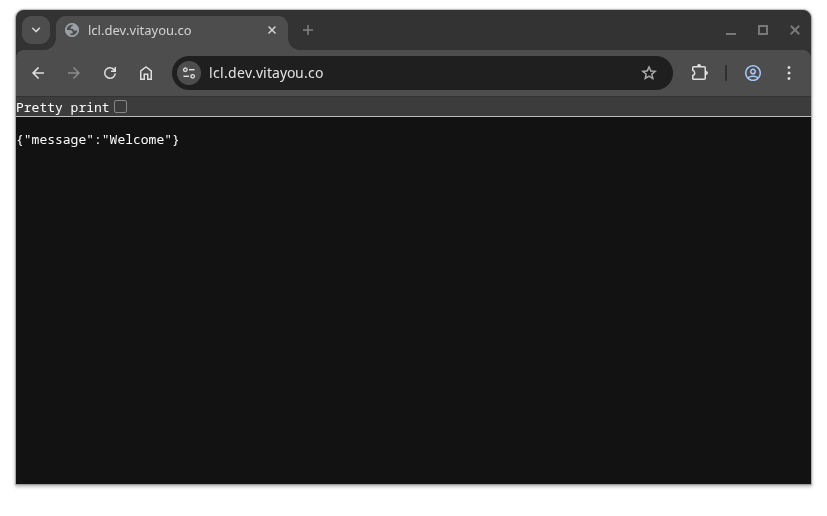
And also visit http://dashboard.vitayou.local (or whatever local domain you set in your .env and hosts file) and try to login.
Details to ask for
To continue developing on the project, you must be aware of the following 3rd party dependencies that you will need access to.
Accounting system API
Vitayou backend connects to a connector API in order to perform accounting integrations for the following entities:
- Customers
- Orders
- Payments
- Invoices
To work with accounting API, the instance of backend (in this case your local dev environment) must be connected to the Pritunl VPN.
If you do not possess the credentials or connection information, PLEASE ASK.
Payment provider API
Vitayou backend connects to the payment provider (currently Paratika) in order to fullfill integration of orders and payment procedures.
To work with payment provider API, you must have entered the valid sandbox or production credentials in your .env file.
If you do not possess the credentials or connection information, PLEASE ASK.
Shipping provider API
Vitayou backend connects to the shipping provider (currently DHL) in order to fullfill integration of orders and shipping procedures.
To work with shipping provider API, you must have entered the valid sandbox or production credentials in your .env file.
If you do not possess the credentials or connection information, PLEASE ASK.
CMS
Vitayou backend connects to the Directus CMS instance to synchronize data which includes but not limited to
- Products
- Mailing templates
To work with CMS synchronization on your local environment, you must have entered the valid sandbox or production credentials in your .env file.
If you do not possess the credentials or connection information, PLEASE ASK.
Nuxt.js Client
Even though a mobile app client is in the plans, currently only the Nuxt.js v3 powered web app exists. So we'll only mention that one for the time being.
Prerequisites
- Node.js 18.x or above
- PNPM 10.16
- Git
1. Clone the project
git clone https://git.vitayou.co/vitayou/vitayou-co.git2. Prepare environment
Copy the .env.example to .env.
Change the environment variables to your liking. You can find the original developer's latest variables below.
Details
NUXT_PUBLIC_SANCTUM_BASE_URL=https://api.vitayou.local
NUXT_BASE_URL=http://app.vitayou.local
NUXT_PUBLIC_BASE_URL=http://app.vitayou.local:3000
NUXT_PUBLIC_DIRECTUS_URL=https://cms.dev.vitayou.co/
NUXT_DIRECTUS_URL=https://cms.dev.vitayou.co/
NUXT_PUBLIC_DIRECTUS_TOKEN=REDACTED

SLACK_WEBHOOK=

NUXT_PUBLIC_PAYMENT_BASE_URL=https://entegrasyon.paratika.com.tr/paratika/api/v2/post/

NUXT_SITE_ENV=dev

NUXT_PUBLIC_GTM_ID=

NUXT_PUBLIC_SENTRY_DSN=

NUXT_PUBLIC_DEMO_MODE=false
Then add the relevant domains to your hosts file i.e.
127.0.0.1 vitayou.local api.vitayou.local dashboard.vitayou.local app.vitayou.localUsage of a local custom domain like app.vitayou.local is strongly encouraged.
3. Install Dependencies
pnpm i4. Start Dev Environment
pnpm dev